Outdoor LED sensor lights are a smart and useful part of modern home security. They help illuminate dark areas, deter unwanted visitors, and make it easier for you to walk around safely at night. Many homeowners depend on them every day because they save energy and turn on only when needed.
In other cases, they flicker, react too slowly, or stop detecting motion completely. When that happens, the first fix is often simple: reset the light.
The good news is that many outdoor LED sensor light reset problems do not require a full replacement. In many cases, a basic reset, a settings adjustment, or a quick cleaning can bring the light back to normal. Let’s go step by step.
Understanding How Outdoor LED Sensor Lights Work
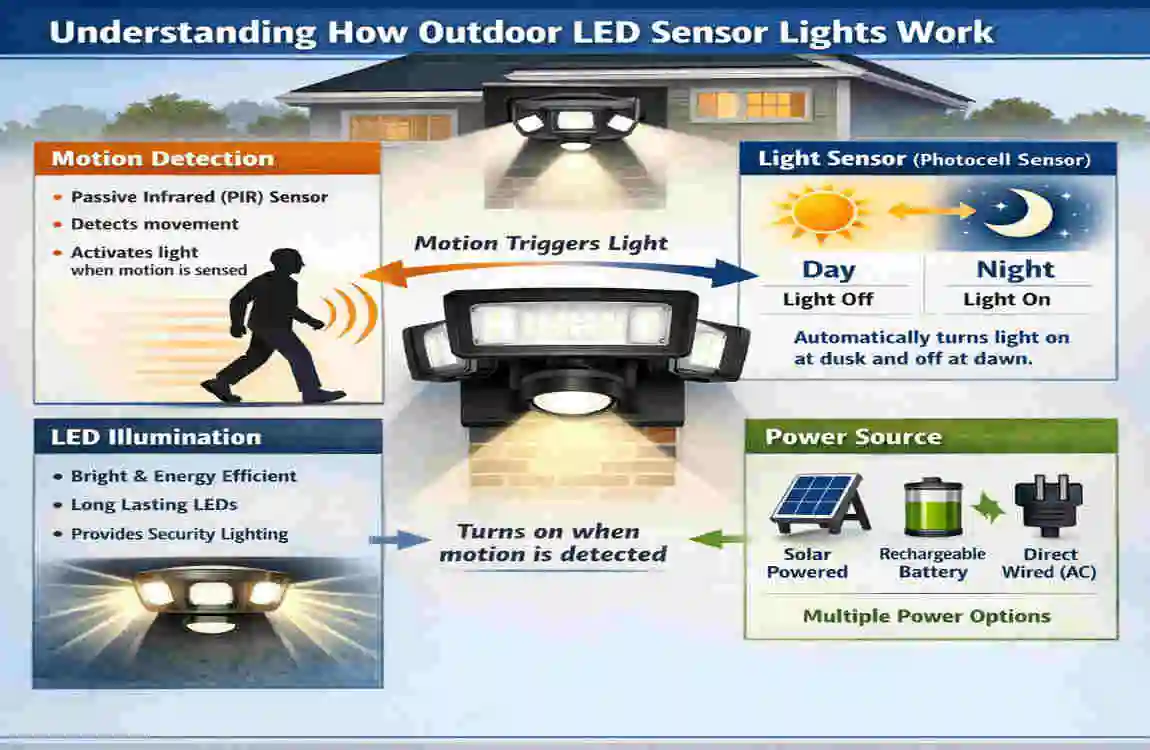
Before you reset anything, it helps to know how the light works. Understanding the parts inside the fixture makes troubleshooting much easier.
What Is an Outdoor LED Sensor Light?
An outdoor LED sensor light is a light fixture that turns on automatically when it detects movement, low light, or both. Most people use it near driveways, doors, garages, yards, and side entrances.
The main purpose is simple: light only when needed. This makes the light more energy-efficient than a regular outdoor lamp that stays on all night. It also adds convenience because you do not need to flip a switch every time you go outside.
Main Components of Sensor Lights
A sensor light consists of several parts that must work together.
- LED bulbs provide the light.
- Motion sensor detects movement in the area.
- Timer settings decide how long the light stays on.
- Sensitivity controls adjust how easily the sensor reacts.
- Wiring and a power source deliver electricity to the unit.
If one of these parts is out of sync, the whole fixture may act strangely. That is why resetting often helps.
Common Types of Outdoor Sensor Lights
Not all sensor lights work the same way. Different types may need different reset methods.
- PIR motion sensor lights: These detect body heat and movement.
- Dusk-to-dawn lights: These turn on when it gets dark and off when the sun rises.
- Solar-powered sensor lights: These charge during the day and work at night without direct wiring.
- Smart outdoor LED lights: These connect to apps, Wi-Fi, or smart home systems.
Knowing your light type helps you choose the right reset method later.
Signs Your Outdoor LED Sensor Lights Need a Reset
Sometimes the light gives clear signs that it needs attention. If you notice any of these issues, a reset is a smart first step.
Lights Stay On Continuously
If your motion sensor light stays on all the time, the sensor may be confused. It could also be reacting to a bad timer setting or a stuck Mode. A reset often clears the error.
Lights Won’t Turn On
If the light never comes on, the problem may be a power interruption, a sensor failure, or an internal glitch. This is one of the most common complaints about LED security lights not working.
Lights Flicker Repeatedly
Flickering can point to loose wiring, unstable voltage, or a failing component. Resetting may help, but it can also show that the fixture needs more than a simple restart.
Motion Detection Stops Working
If people walk right past the light and nothing happens, the sensor may be blocked, dirty, or temporarily frozen by a software issue. This is especially common in smart models.
Delayed Response or Random Activation
When the light turns on too late, too early, or for no clear reason, the settings may be off. Wind, pets, passing cars, and heat sources can also trigger false alerts.
Safety Precautions Before Resetting Outdoor LED Sensor Lights
Safety should always come first. Even if the fix seems small, you are still working with electricity.
Turn Off Electrical Power
Before touching the fixture, turn off the power at the switch or breaker. This helps prevent shock and keeps the process safe.
Use Proper Safety Equipment
Wear dry gloves if needed, and use a stable ladder if the light is mounted high. Make sure the ground is dry and firm.
Check Manufacturer Instructions
Different brands use different reset steps. Some lights need a button press. Others need a power cycle. A quick look at the fixture manual can save time.
Avoid Water Exposure
Try to reset the light during dry weather. Moisture can make the process unsafe and may also hide other problems in the fixture.
How to Reset Home Sensor Lights Outdoor LED
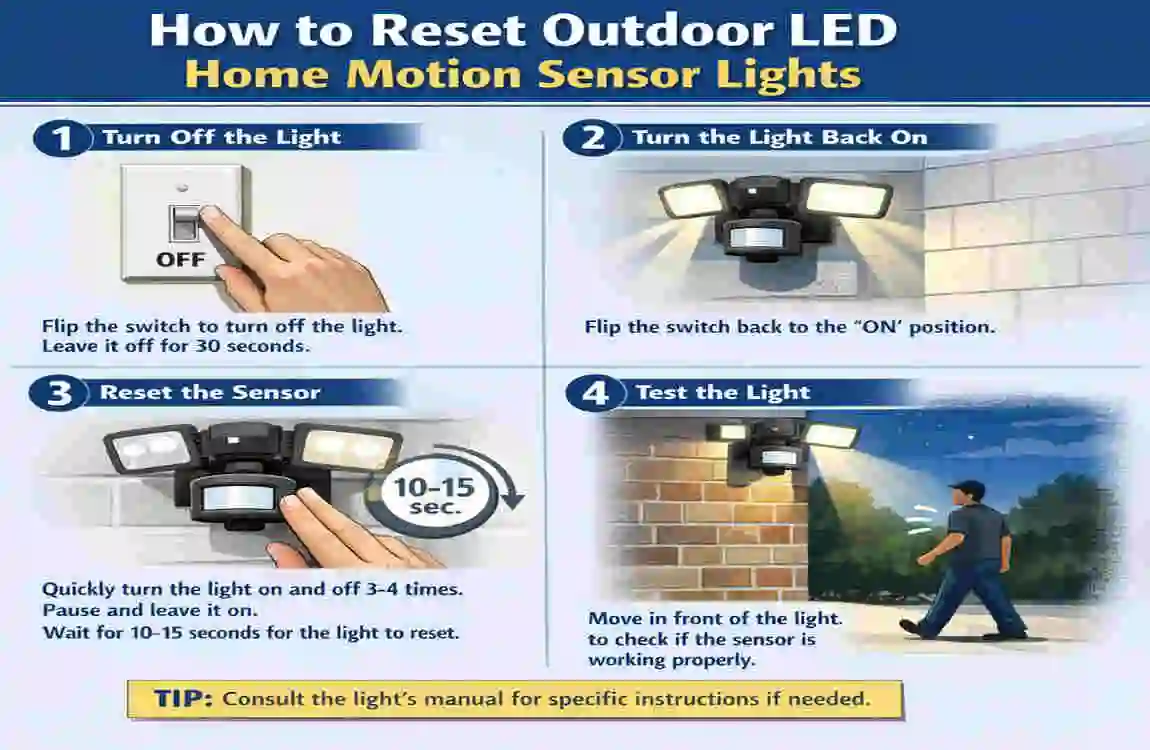
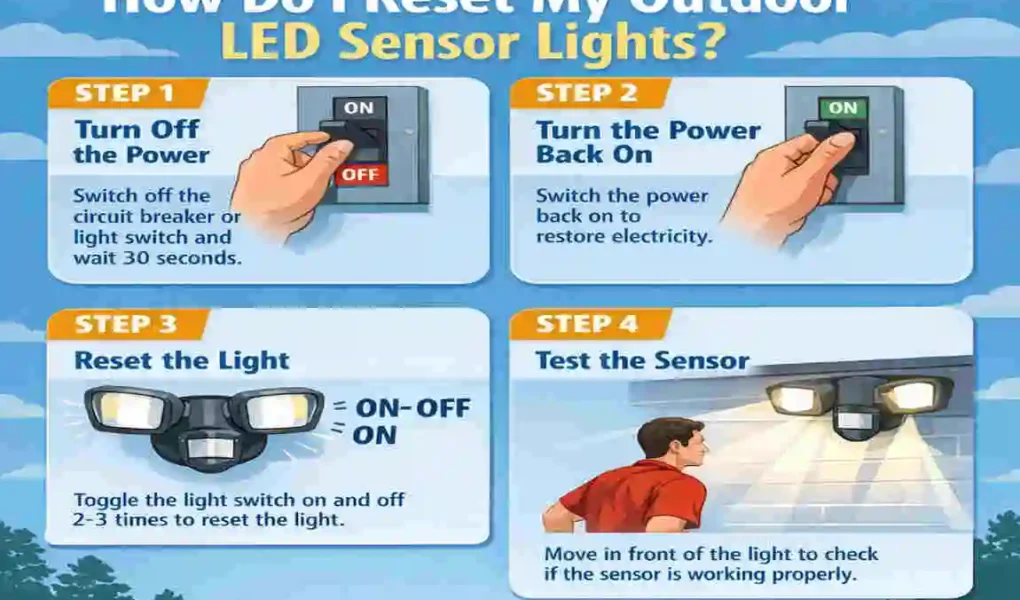
This is the core part of the process. If you want to learn how to reset outdoor LED home sensor lights, start with the simplest method and move on only if needed.
Basic Power Cycle Reset
This is the easiest and most common reset.
- Turn the light switch off.
- Wait 30 seconds to 1 minute.
- Turn the power back on.
- Watch the light and test it with motion.
This simple step can clear minor glitches and restore normal operation. Many reset motion sensor light problems are fixed this way.
A power cycle works because it forces the internal electronics to shut down and restart. If the light is stuck in the wrong Mode, this often clears it.
Circuit Breaker Reset
If the switch does not help, use the breaker panel.
- Find the breaker that controls the light.
- Switch it off.
- Wait several minutes.
- Turn it back on.
This method gives the fixture a deeper reset than a wall switch. It is useful when the light keeps acting strangely after a basic restart.
If you have multiple outdoor lights on the same circuit, this method may reset all of them at once. That is normal.
Wall Switch Reset Sequence
Some lights respond to a switch pattern instead of a full power cut.
A common sequence is:
- Off
- On
- Off
- On
In some cases, the light must be switched quickly. In others, a slower timing pattern works better. The exact sequence depends on the brand.
This method is common in many luxury homes because it is simple and does not require tools. It can help with outdoor motion light troubleshooting when the fixture is stuck in a bad setting Mode.
Resetting Smart Outdoor LED Sensor Lights
Smart lights need a slightly different approach.
If your light connects to an app, you may need to:
- Open the app.
- Find the light settings.
- Choose Reset, Reconnect, or Factory Reset.
- Reconnect the light to Wi-Fi.
- Test motion detection again.
A smart outdoor LED light reset may also require pressing a small button on the fixture or holding it for several seconds. If the light was disconnected from the app, reset it and pair it again from the beginning.
Smart models can also need firmware updates. If the app shows one, install it before testing the light again.
Resetting Solar LED Motion Lights
Solar lights often work differently from wired fixtures.
To reset them:
- Turn the light off if it has a switch.
- Disconnect the battery if possible.
- Let the unit sit long enough for stored power to drain.
- Reconnect everything.
- Place the solar panel in good sunlight.
- Test the light at night.
This method helps clear stored charge and may fix sensor confusion. Solar models sometimes need a full reset after cloudy weather, battery wear, or long inactivity.
Testing the Sensor After Reset
After resetting, do a simple walk test.
Walk slowly across the sensor’s range while it is dark enough for the light to activate. If the light comes on, the reset worked.
A few useful tips:
- Test after sunset or cover the photocell if needed.
- Walk in different directions.
- Wait between tests so the timer can reset.
- Adjust the sensor if the trigger zone is too narrow or too wide.
A reset is only part of the job. Testing tells you whether the light is truly back to normal.
Why Outdoor LED Sensor Lights Stop Working
A reset can fix many issues, but it helps to know why the problem happened in the first place.
Power Supply Problems
If power is interrupted, the light may stop responding. Tripped breakers, loose wiring, or a weak connection can all cause trouble.
Dirty or Blocked Sensors
Dust, cobwebs, bird droppings, and leaves can cover the sensor. When that happens, the light may miss movement or react too slowly.
Incorrect Settings
If the sensitivity, timer, or daylight setting is incorrect, the light may appear broken even when it is not.
Weather Damage
Outdoor fixtures are exposed to rain, heat, snow, wind, and humidity. Over time, these conditions can damage seals, wires, or the sensor housing.
Old or Failing Components
LEDs last a long time, but they do not last forever. Sensors, drivers, and other parts can wear out too. If the fixture is old, resetting may only help for a short time.
Light Still Won’t Turn On
Check the bulb or LED module first. Some fixtures use built-in LED boards, so the whole unit may need attention if the board fails.
Also check:
- The wall switch
- The breaker
- The wiring
- The power source
If everything looks fine, but the light still does not respond, the fixture may have internal damage.
Motion Sensor Still Malfunctioning
If the light turns on only sometimes, the sensor may need to be repositioned. Make sure nothing blocks its view.
Try adjusting the detection range so it covers the right area without reaching the street, trees, or passing traffic.
Lights Turn On During Daytime
This usually means the photocell or daylight sensor is not reading light correctly. Dirt, bad placement, or incorrect settings can all cause this.
Try cleaning the sensor and adjusting the lux or daylight setting.
Lights Flash or Blink Constantly
A blinking light can point to a damaged driver, unstable power, or a failing LED board. If a reset does not stop the flashing, the issue may be hardware-related.
Smart Sensor Light Connectivity Problems
If your light relies on Wi-Fi, check the Wi-Fi connection. Weak signal, app errors, or outdated firmware can interrupt performance.
Try:
- Restarting the router
- Reconnecting the light
- Updating the app
- Moving the hub closer, if possible
How to Adjust Outdoor LED Motion Sensor Settings
A good reset often works best when followed by proper settings.
Adjusting Sensitivity
Sensitivity controls how easily the sensor reacts. If it is too high, the light may turn on for every small movement. If it is too low, it may miss people walking by.
Start in the middle range, then test and adjust slowly.
Setting Detection Range
The range decides how far the sensor can “see.” A wide range is useful for driveways and large yards. A smaller range works better near doors or patios.
Choose a setting that matches the space.
Configuring Timer Duration
The timer duration determines how long the light stays on after motion stops. A short timer saves energy. A longer timer gives more light for walking, carrying groceries, or unloading the car.
Changing Lux or Daylight Settings
Lux settings tell the light when to turn on based on the level of darkness. If the setting is too sensitive, the light may turn on too early. If it is too low, it may wait until the area is very dark.
A good setting helps the light work only when needed.
Preventive Maintenance Tips for Outdoor LED Sensor Lights
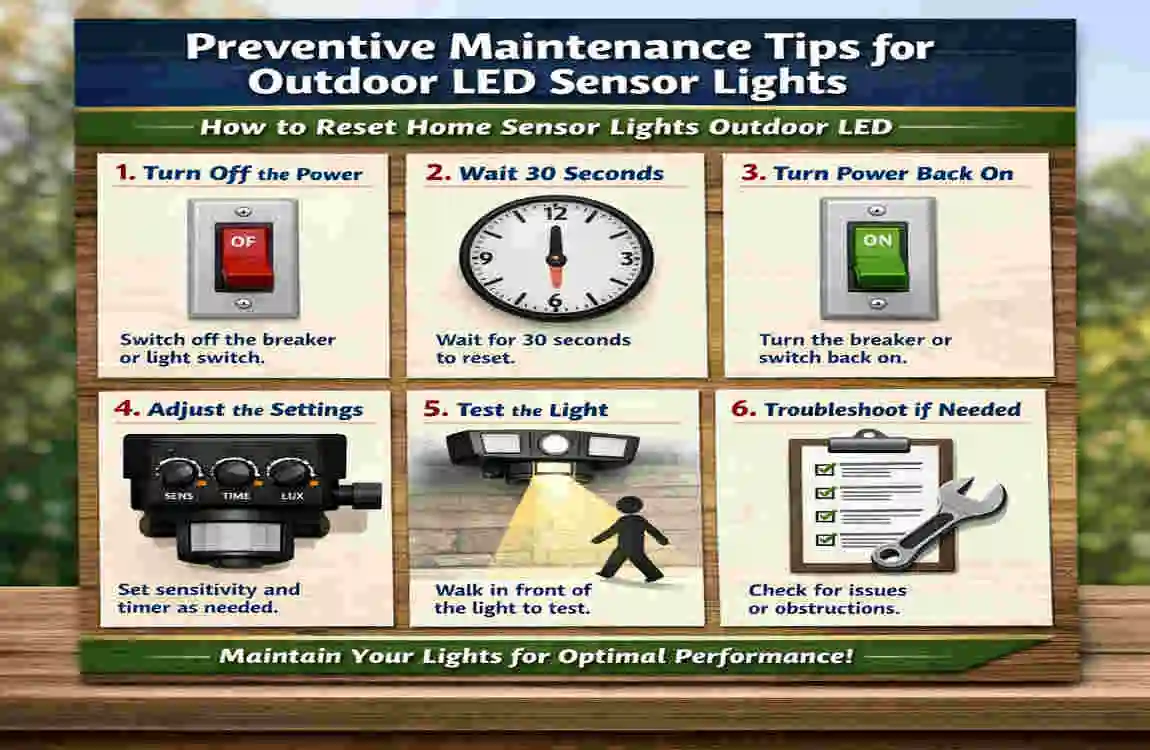
A little care goes a long way. Regular maintenance can reduce the need for future resets.
Clean Sensors Regularly
Wipe the sensor gently every month or so. Keep it free from dust, spider webs, and debris. This helps the light respond properly.
Inspect Wiring Annually
Look for signs of wear, loose connections, or damage. If you notice corrosion, cracked insulation, or burned areas, get help quickly.
Protect Fixtures from Weather
Make sure the housing is sealed well. If your area gets heavy rain or snow, choose fixtures built for outdoor use and check them often.
Update Smart Light Firmware
If your light is smart, keep its software up to date. Updates can improve performance, fix bugs, and improve security.
Replace Ageing Components Promptly
Do not wait for a complete failure if the fixture is clearly ageing. Swapping worn parts early can extend the system’s life.
When You Should Replace Instead of Resetting
Sometimes a reset is not enough. At a certain point, replacement is the better choice.
Frequent Failures
If you keep resetting the same light every few days, it may have a deeper issue. Repeated failure often means the unit is wearing out.
Excessive Energy Consumption
Older fixtures may use more power or work less efficiently. A newer LED model can save energy and give better performance.
Cracked Housing or Water Damage
If water has gotten inside the fixture or the housing is cracked, replacing the light is safer than trying to keep it alive.
Outdated Technology
Older lights may not have the same control, range, or smart features as newer models. Upgrading may be the smarter long-term choice.
Best Outdoor LED Sensor Light Features to Look for
If you decide to upgrade, look for features that make daily use easier and more reliable.
Adjustable Motion Detection
This helps you set the light for your exact space. A flexible sensor gives you better control.
Waterproof Ratings
Choose a fixture made for outdoor conditions. Good weather protection matters a lot.
Smart Home Compatibility
If you want app control or voice features, look for a model that works with your existing smart system.
Energy Efficiency Certifications
Efficient lighting saves money and often lasts longer. They also reduce unnecessary power use.
Wide Detection Angles
A wider angle can cover more space, which is helpful for driveways, garages, and side yards.
Frequently Asked Questions
Why is my outdoor sensor light staying on all the time?
This usually happens because the timer is set too long, the sensor is dirty, or the fixture is stuck in a Mode. A reset and setting adjustment usually helps.
How long should I leave my sensor light off to reset it?
For a basic reset, leave it off for 30 seconds to 1 minute. For a deeper reset, wait several minutes or use the breaker.
Can weather affect outdoor LED sensor lights?
Yes. Rain, heat, cold, and moisture can all affect performance. Weather can also damage wiring and sensor seals over time.
How do I reset a motion sensor light without a switch?
Use the breaker panel, or follow the fixture’s built-in reset method if it has one. Solar and smart lights may also need battery, app, or button resets.
Why does my LED sensor light blink continuously?
Continuous blinking can mean loose wiring, a failing driver, or voltage instability. If a reset does not help, the fixture may need repair or replacement.
Do outdoor sensor lights wear out over time?
Yes. Even good LED lights and sensors eventually age. If resets do not help and the problems keep returning, replacement may be the best option.
| Search intent | Quick answer | Common reset steps | Helpful tip |
|---|---|---|---|
| Informational | Resetting outdoor LED sensor lights usually starts with cutting power, then using the fixture’s reset button or power-cycling the breaker. | Turn off the breaker, wait 30 seconds to 1 minute, turn it back on, then test the light. | Check the manual, because some models need a longer power-off period to fully reset. |
| Troubleshooting | If the light stays on, won’t turn on, or triggers randomly, a reset can clear temporary sensor glitches. | Look for a reset button, or flip the wall switch/breaker off and on in the pattern recommended by the model. | Clean the sensor lens and check for loose wiring or moisture before replacing parts. |